Showing posts with label root LG. Show all posts

Monday, 3 August 2015

Guide To Enter Download Mode On LG Android Smartphone.

Guide To Enter Download Mode On LG Android Smartphone.

Enter Download Mode On LG Android. Today's guidebelajar will show to you about guide how to Enter Download Mode On LG Android Smartphone. All android expert user must know how to enter download mode on their android smartphone, this is an important mode for the android devices. Many reason that should you know why you have to enter download mode on android devices. The main reason is when we going to flash or install a new firmware to our android system, it is mean our android device in bootloop state, or you just want to upgrade your android firmware or ROM.

When You enter downlaod mode on LG android smartphone you can  do various operations to your phone using your computer, for example to apply an update manually. Before you proceed to enter download mode on your android device, please make sure that your device is an LG Android Smartphone, it is work for most of LG android smartphone. The guide from below have been tested only on the mentioned device, which means that this guide will not work in case you have a similar or different Android based devices. So read this article carefully.

Guide To Enter Download Mode On LG.

Please follow this guide to enter download mode on android smartphone devices.
  1. First time that should you do is Power Off your LG Smartphone.
  2. Or you can Remove battery out from your phone, if your device is removable battery
  3. Plug USB cable to your PC, 
  4. Press and Hold volume UP Button, while plugs in USB Cable from PC to your Phone.
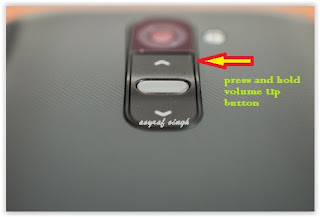
    Enter Download Mode On LG Android
    Enter Download Mode On LG Android
  5. Then will appear white note (download mode) on your LG phone, if you see this you can releasa Volume UP button.
  6. Press and hold volume UP Button on your LG phone again, until you see FIRMWARE UPDATE message.
  7. If your phone has been detected in your PC (to make sure, click the monitor icon beside Read Phone Information button, this action will open device manager windows. If your phone was detected you can see this at the top)
  8. Click START, and you will see dialogue box, just click OK
  9. Wait for the flash process, it will run in approximately 5 minute and your LG will restart itself
  10. Then your LG phone will boot up, if you can see Welcome Screen, it's mean Flashing process is successfully.
  11. Unplug USB cable, and finish
  12. Now your LG is installed new firmware.


Sunday, 2 August 2015

Guide To Install TWRP Recovery On LG G STYLO.

Guide To Install TWRP Recovery On LG G STYLO.

Install TWRP Recovery On  LG G STYLO. Today's guidebelajar will share guide how to install Custom Recovery TWRP On  LG G STYLO. This device comes with 5,7 Inchi wide LCD, work on Android OS, v5.0.2 (Lollipop) and supported with 1.2 GHz Qualcomm Snapdragon 410 MSM8916 quad-core, GPU Adreno 306, combined with 2 GB of RAM and 8 MP as their engine. We know that TWRP is a custom recovery for Android smartphones that have much more complete features  than the default recovery. There are 3 kinds of custom recovery that is CWM (Clock World Mode), TWRP (Team Win Recovery Project), and Philz Touch. From three of recovery above, I Think using TWRP is most easiest. Because TWRP is supported touch screen.


Before you proceed to install TWRP custom recovery, you should back up all data contained in the  LG G4 (File, Music, Video, IMEI). We do it to restore  LG G4 if this phone bootloop. A bootloop android smartphone can still enter recovery mode. So, if you Install Custom Recovery TWRP On LG G4 you can repair your phones.
Do you know what is TWRP ?, TWRP is the most popular custom recovery for Android devices (now including LG G4 devices). Using TWRP is a powerful and very flexible recovery which can flash zip files (ROMs & mods), make and restore a full Nandroid system backup, wipe data stored in LG G4 and perform a factory reset on LG G4. 

How To Install TWRP Recovery On LG G STYLO.

Now you can follow this guide To Install TWRP Recovery On LG G STYLO. But, this method is require root access for LG G STYLO. for further guide how to root LG G STYLO you can see this guide.  So, If you have not root access to thisd evices, TWRP will not be installed on ths android devices.


In this guide you can find two guide How To Install TWRP Recovery On LG G STYLO. And you must have unlocked bootloader too for this device. you can find how to do this on this guide.

Guide

  1. First time you need is Download the latest TWRP .img file for the LG G STYLO (file name is: twrp-2.8.7.0-test-omni.img. and you can download this file here)
  2. Then copy paste the .img file in the root of the internal storage of your LG G STYLO phone.
  3. Then, Install ADB Shell or Terminal Emulator from the Play Store.
  4. Execute the following code:
    • su
    • dd if=/sdcard/twrp.img of=/dev/block/bootdevice/by-name/recovery
  5. The other way, you can also flash the TWRP .img from your computer.

  6. How to do this is very simple way. 
  7. Just put your LG G STYLO phone in bootloader mode and run the following code:
    • fastboot boot twrp-2.8.7.0-test-omni.img
  8. Wait the process is finished, 
  9. Now TWRP will be installed on your LG G STYLO and you can start flashing ROMs on your devices